
Credit Card / Loan Benefit Request Automation
Submitted by Rashed Abdullah Altammar
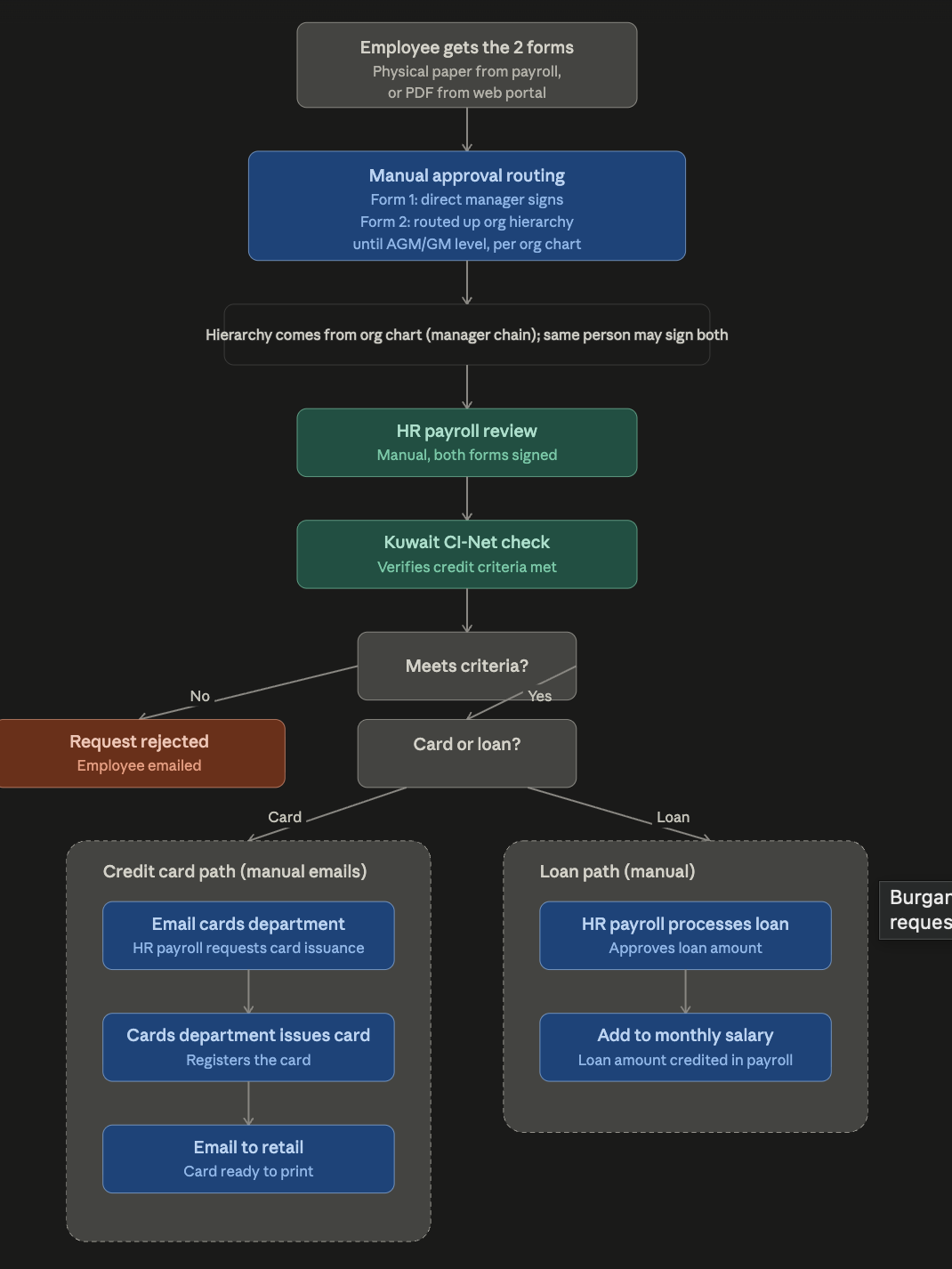
Pain point
Today the process is fully manual except the first step: employees collect a paper form in person or download a PDF, get it physically signed by their manager and then by an AGM/GM (routed up the org chart), hand it to HR Payroll, and everything after that (CI-Net check, notifying Cards, or updating payroll for a loan) happens over email with no tracking or automated routing.
Proposed solution
Automate the process with Power Automate. Employees submit one digital form specifying card or loan. The flow routes approval using the existing Microsoft org hierarchy — first to the direct manager, then up the chain until it reaches AGM level or above (skipping a step if one person already holds both roles). Once approved, it notifies HR Payroll to run the Kuwait CI-Net check. If the employee doesn't meet the criteria, they're automatically emailed a rejection. If approved: for a card, the flow emails the Cards department to issue it, then emails Retail once it's ready to print; for a loan, it routes to HR Payroll to add the approved amount to the employee's monthly salary. Claude helps HR Payroll review request status and draft notification emails at each stage.
Claude surface
Cowork